

How AI Builder helped me solve a very practical Power Platform problem
Dec 30, 2025 • 5 • 975
Table of contents
AI Builder is a feature within the Microsoft Power Platform that allows you to create and use AI models to automate and optimize business processes. You’ll often see impressive demos: invoices, receipts, images, predictions.
But this blog is not about a complex AI use case. It’s about a very down-to-earth, real-life problem that you may recognize.
And that’s exactly why I’m sharing it.
Context: AI-first… but still practical
At the company I work for, we have an “AI-first” strategy. Sounds great (and it is) but if I’m honest, my first instinct is often:
Can I solve this with the Power Platform techniques I already know?
Expressions. Conditions. Switch cases. Maybe a bit of regex if I’m feeling brave.
In this scenario, I tried. And quickly realized: this would become ugly, fragile, and hard to maintain.
That was the moment where AI actually became the simplest solution.
The real-life scenario
We receive lines of free-text input coming from users, emails, or uploads. Each line describes a commercial agreement or contribution and somewhere in that text, a period is mentioned.
Examples like: The scenario is a situation in which the input are line of text with multiple details in it.
- Retailer A 42204504 contribution 4% Q3 2025
- Retailer B 4224054045 promotional allowance 2% Oct-Nov 25 Region X
- Retailer C DK 047891233 bonus Nov 25
- Retailer D 404204042 anniversary bonus 25 years 2026
- Retailer D 57278287007 recycling 0.25% Jan-Feb 25
- Retailer F 40646707 partner alliance EH 2% Q4 2024
- Retailer G 4564080/456045670 online category 1% Q3 2025
- Retailer G 176104/70930118 online 1% Q1 2025
- Retailer H FR 0452424524 dynamic 3% 2024 Concept Y
If you work in finance, retail, or operations: you’ve seen data like this a lot.
The challenge
From each line, we needed to extract two clean values:
- from_date
- to_date
The desired outcome
The result examples for each lines should be like displayed in the table below.
| Input | Output: from date | Output: to date |
|---|---|---|
| Retailer A 42204504 contribution 4% Q3 2025 | 2025-07-01 | 2025-09-30 |
| Retailer B 4224054045 promotional allowance 2% Oct-Nov 25 Region X | 2025-10-01 | 2025-11-30 |
| Retailer C DK 047891233 bonus Nov25 | 2025-11-01 | 2025-11-30 |
| Retailer D 404204042 anniversary bonus 25 year *2026 | 2026-01-01 | 2026-12-31 |
| Retailer D 57278287007 recycling 0,25% jan-feb25 | 2025-01-01 | 2025-02-28 |
| Retailer F 40646707 partner alliance EH 2% Q4 2024 | 2024-10-01 | 2024-12-31 |
| Retailer G 4564080/456045670 online category 1% Q3'25 | 2025-07-01 | 2025-09-30 |
| Retailer G 176104/70930118 online 1% Q1'25 | 2025-01-01 | 2025-03-31 |
| Retailer H FR 0452424524 dynamic 3% 2024 Concept Y | 2024-01-01 | 2024-12-31 |
Why classic Power Platform logic falls short
Yes, technically you could solve this with:
- Endless contains() checks
- Nested conditions
- Month mappings in variables
- Special cases for quarters, years, apostrophes, and languages
But take a step back and think about what that solution would actually look like in practice. Would the flow still be readable a few months from now? Would it be easy to extend when a new date format shows up? And when another developer opens the flow for the first time, would they understand it?
For me, the answer to all of those questions was a very clear no.
Enter AI Builder – Custom Prompts
Instead of building logic for every edge case, I used AI Builder → Run a prompt.
The idea was simple:
Let the AI interpret the text like a human would and return structured dates.
The prompt
The key was being very explicit about:
- What the input looks like
- How the AI should reason
- What the output must look like
Task
Determine the correct "from date" and "to date" based on the provided information.

Input Data (JSON Format)
{
  "description": "string"
}

the input:
/jsoninput

Processing Logic (Priority Order)

1. Identify Period Indicators (if no explicit dates found)
Look for these keywords in the description:
"Q3'25", "okt25", "okt-nov25"
Quarter indicators: - "Q1", "Q2", "Q3", "Q4", "1st quarter", "2nd quarter", etc. → Use quarter date ranges
Half-year indicators: - "H1", "H2", "S1", "S2", "first half", "second half" → Use half-year date ranges
Year indicators: - Year mentioned (e.g., "2025" or "25" )

Additional Considerations
- Account for leap years (February 29)
- Use correct days per month (28/29/30/31)
- Handle various date formats and separators

Output Format
{
"from_date": "YYYY-MM-DD",
"to_date": "YYYY-MM-DD"
 }

Examples
Example 1 - quarterly:
Input: { "description": "Supermarkt 12345345 bonus 4% Q325
" }
Output: { "from_date": "2025-07-01", "to_date": "2025-09-30" }

Example 2 - multiple months:
Input: { "description": "Bakker 654321 extra 2% okt-nov25 Hoog " }
Output: { "from_date": "2025-10-01", "to_date": "2025-11-30"}

Example 3 - one month:
Input: { "description": "Slager 123789 party 1,5% nov25 Laag " }
Output: { "from_date": "2025-11-01", "to_date": "2025-11-30" }

Output Requirements
- Return ONLY valid JSON
- No explanations or additional text
- Ensure all dates are in YYYY-MM-DD format
- Validate before returning
Using it in Power Automate
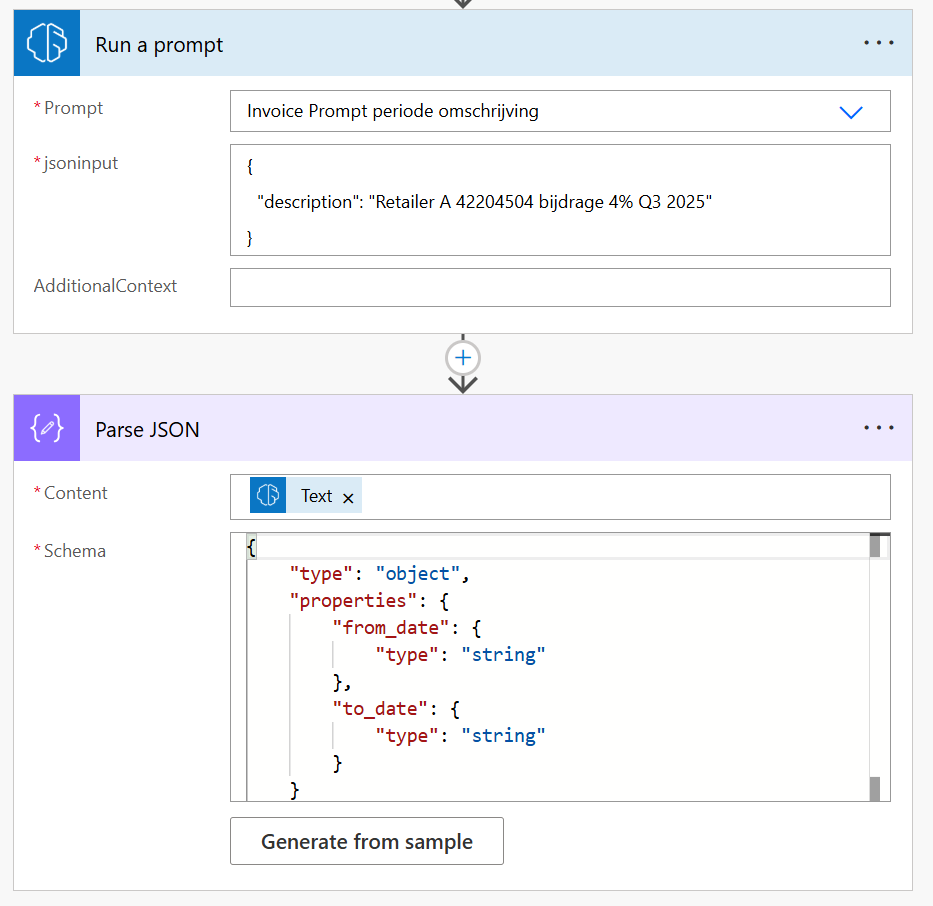
The flow itself is very simple:
- Run a prompt (AI Builder)
- Pass the description text
- Receive clean JSON
- Parse JSON
- Use from_date and to_date anywhere in the flow
Because the prompt is forced to return valid JSON, parsing is trivial and reliable.
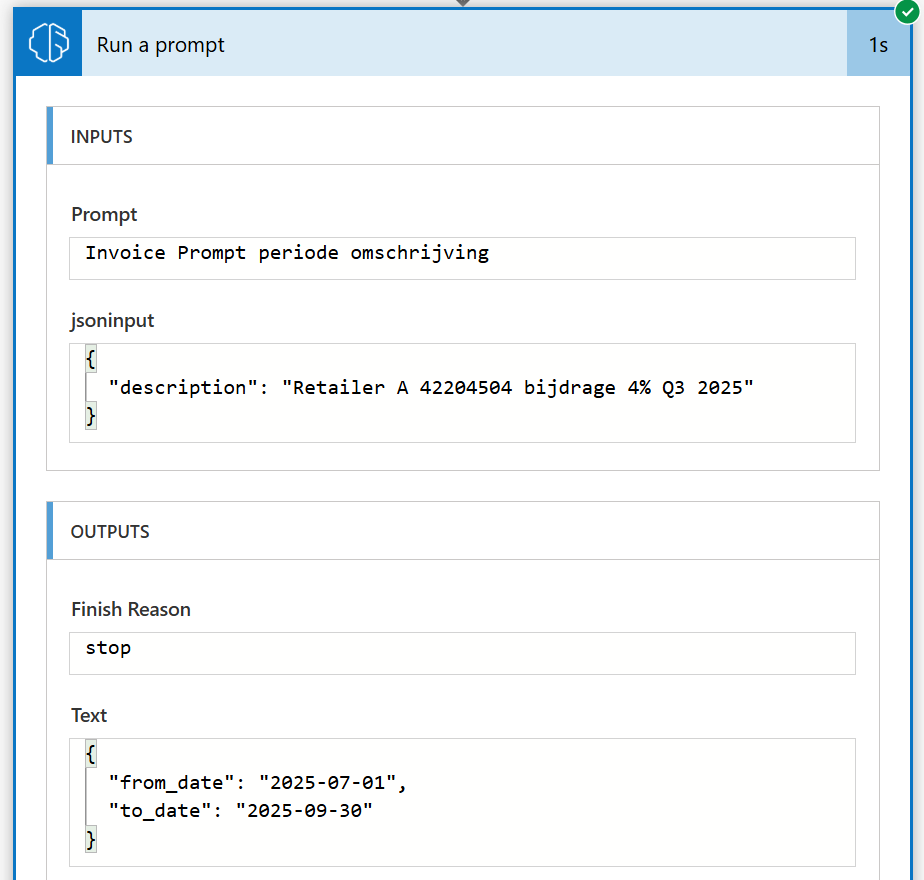
Output for run a prompt:
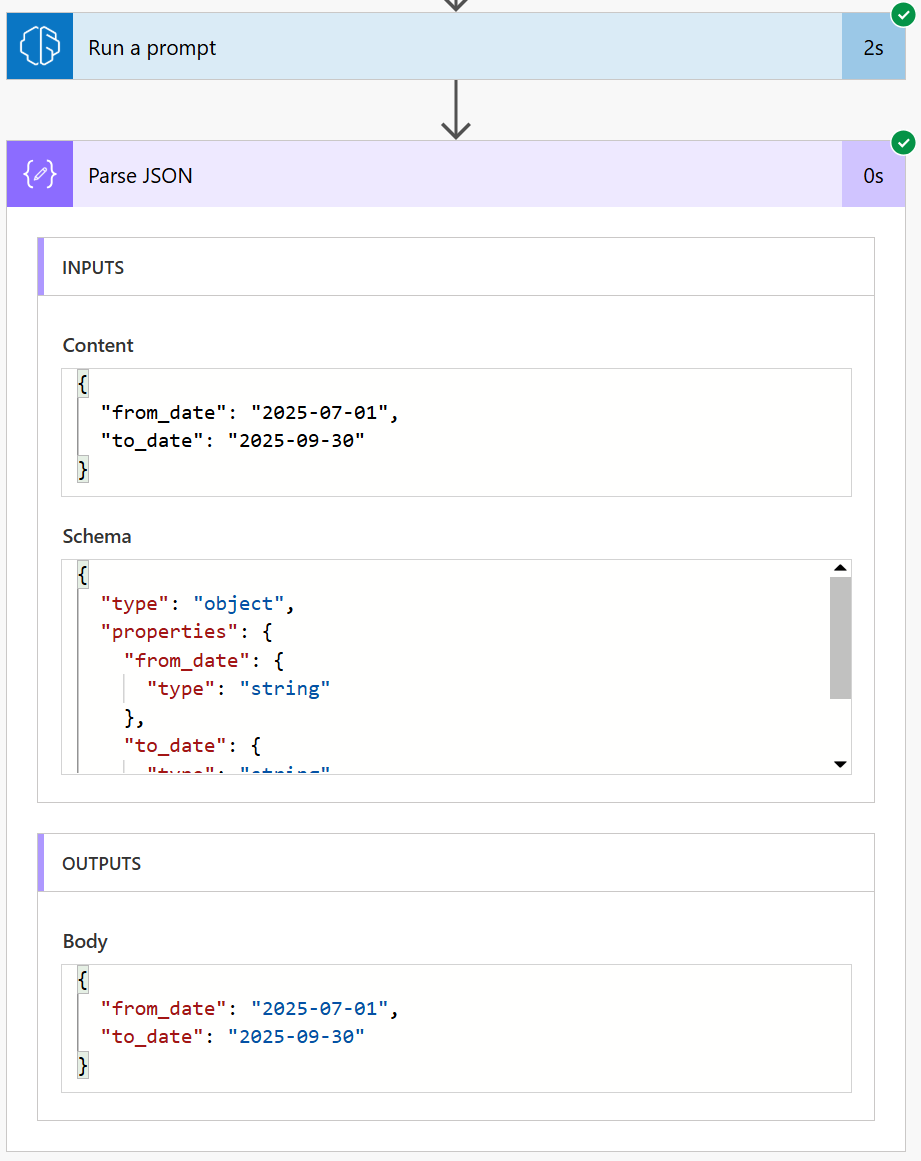
Output for ParseJSON:
What I learned
Talking to colleagues and reading similar examples, a few patterns stand out:
Testing matters more than prompt length: Try weird inputs early.
Tell the AI also what not to do.
Examples are gold: They anchor the behavior far better than abstract rules.
This doesn’t need to be complex to be valuable: Small AI use cases often have the biggest impact.
Final thought
This is not a groundbreaking AI solution. It won’t end up in a keynote.
But it removed complexity, made the flow cleaner, and saved future maintenance time.
And honestly? Those are often the best AI wins.
If you’re working with semi-structured text and you’re forcing Power Automate to behave like a language parser, it might be time to let AI do what it’s actually good at.