
SharePoint Content Companion
Mar 15, 2026 • 3 • 597
Table of contents
Every organization has an intranet. The goal is simple: people should read it.
Most organizations invest a lot in their intranet. Beautiful SharePoint sites. Great UX design. Perfectly structured pages.
But here’s the real question: Does anyone actually know if people find the content valuable? Because measuring engagement on a SharePoint intranet is not that simple. Yes, SharePoint gives us statistics: Site usage, Viva Connections insights, page analytics.
In the past I already wrote a blog series to measure user engagement more deeply. In the first part of this blog series, you could read how to use the Power Platform to measure user engagement even more deeply using KPIs regarding user engagement. In part 2 the KPI regarding page freshness was covered. In part 3 a Power BI dashboard is set up to display the statistics.
From just numbers to importance
But those numbers only show what happens on the surface. What they don’t show… is whether the content is actually good.
And that’s exactly where things get interesting.
Engagement data shows the surface. AI reveals what’s underneath.
So we asked ourselves one question: What if AI could review your intranet content… the same way a human editor would?
In other words… What if we could add AI-powered content intelligence to SharePoint?
And that is exactly what we built.
Meet the SharePoint Content Companion
An AI agent designed to analyze and evaluate SharePoint content.
The idea is simple. A user can open the agent and immediately see the most recent pages that were published on the intranet. The user simply enters the page ID and requests an evaluation. Behind the scenes, a flow is triggered that retrieves the page content and sends it to an AI evaluation prompt. Within seconds, the user receives a detailed content quality report.
Report
The report provides several insights. First, the AI generates a short summary of the page. Then it evaluates different aspects of the content, such as:
- Content quality
- Clarity
- Relevance
The report also highlights potential issues. And finally, the AI provides recommendations on how the page could be improved.
All of this information is presented to the user directly in the chat interface using an adaptive card — so instead of raw JSON data, the user sees a clean and structured report.
Evaluation Over Time
But the insights don’t disappear after the evaluation. Every report is automatically stored in a SharePoint list.
This means the organization can track content quality over time. Teams can review previous evaluations.
Submission video
The video as part of the submission:
Architecture
Here’s what happens behind the scenes:
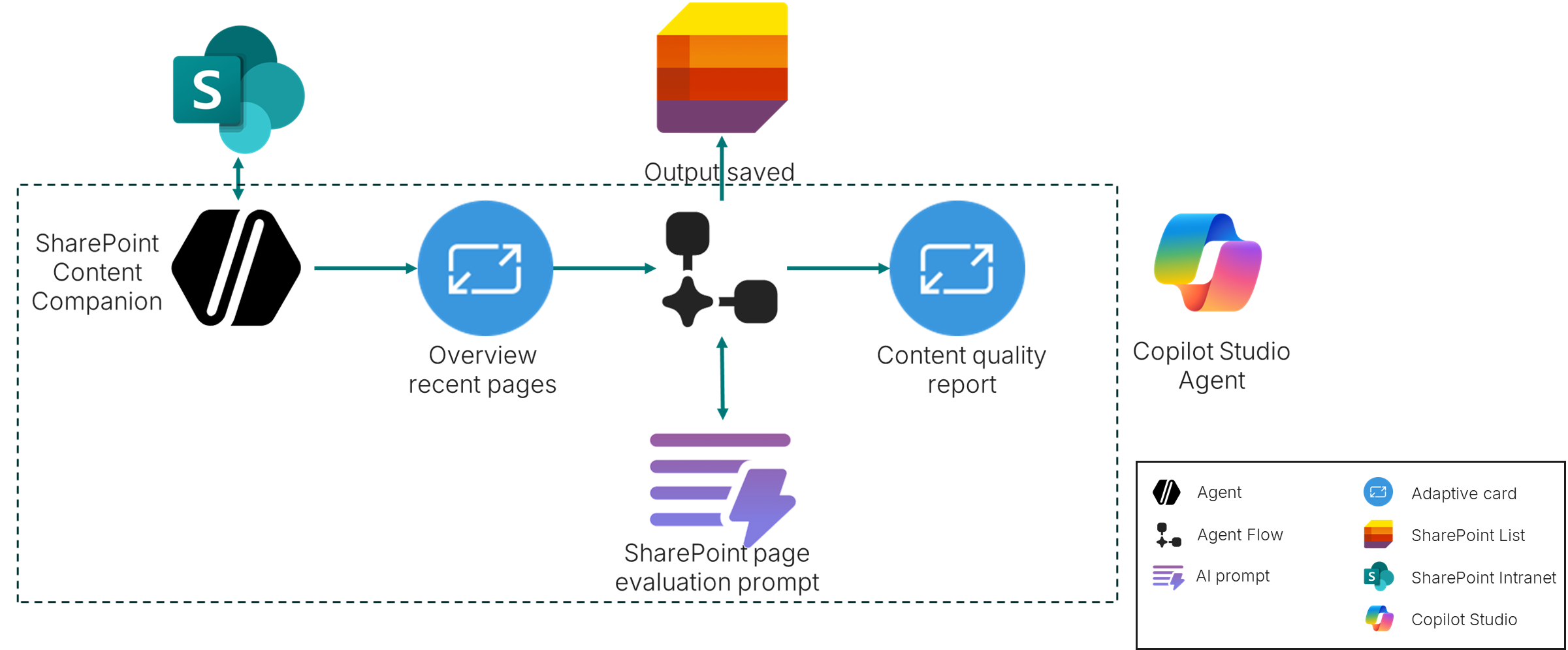
- The SharePoint Content Companion agent uses SharePoint as its knowledge source.
- Based on filtering, it retrieves the most recent pages from the intranet.
- When the user selects a page, a Power Automate flow is triggered.
- This flow retrieves the page content and sends it to an AI prompt designed to evaluate the page.
- The prompt produces a structured JSON output — ensuring every page is evaluated consistently.
- That structured output is then stored in SharePoint and visualized for the user in an adaptive card.
The entire solution was built using Copilot Studio.
Closing
This approach fits perfectly with the direction Microsoft is taking:
“We are the agent company. We believe in a future where there will be an agent for everyone and everything you do.”
Agents that assist us. Agents that analyze information. Agents that help us make better decisions.
And in this case, an agent that helps organizations understand the true quality of their intranet content.
Not just what people click. But what actually matters.